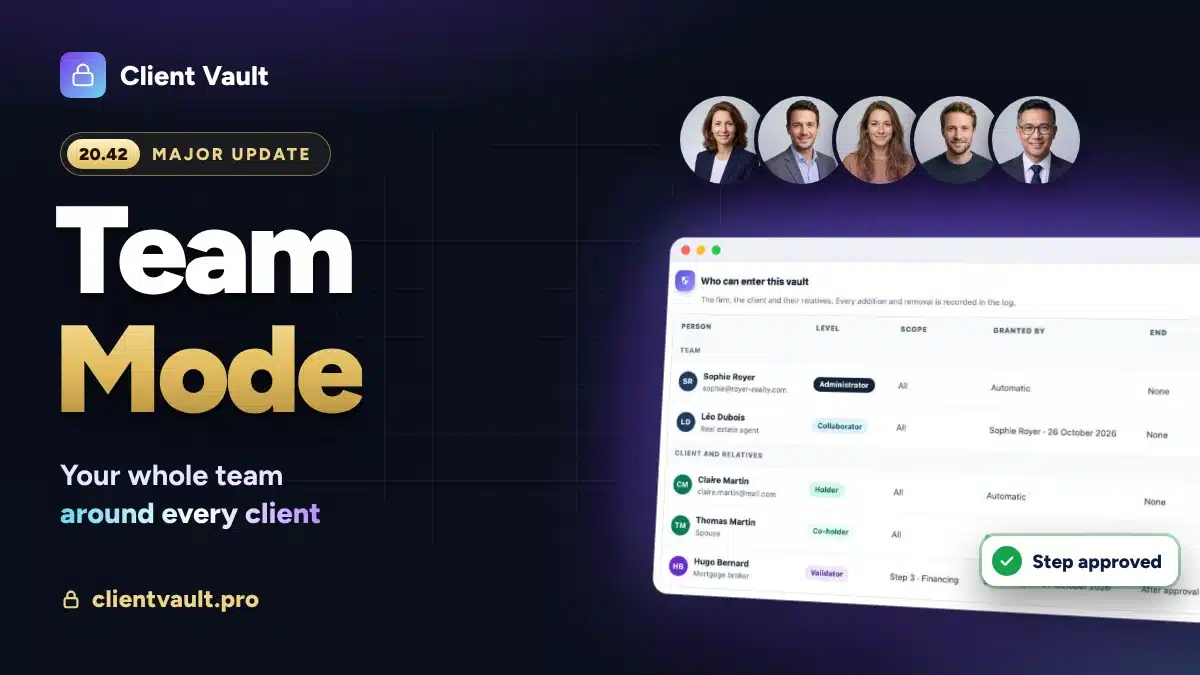
A clear list, a deadline and a vault in your name: your clients finally know what to send you, and when. Documents land in the right place, the vault sends the reminders for you, and everything stays on your own server.
Friday, 6 pm. You kept your evening free to finish the submissions due on Monday. Only one document is missing: your client’s latest tax assessment, requested by email on Tuesday.
You follow up by email. Then by text message. At 8 pm, you call him. He is sorry, the paper is in a drawer, he will send it tomorrow morning. As a photo, taken at an angle, on WhatsApp.
I see this scene in almost every firm I work with. And I will be direct: your client is not acting in bad faith. At any given moment, he simply does not know what you expect from him. So the answer is not to chase harder. It is to give him one clear place to upload his documents.

Why case documents get lost
Email is everyone’s tool. It is simple and it works everywhere. But it was never designed to gather the documents of a case. A document request by email is a sentence in the middle of a thread. The client reads it, keeps it “for later”, and loses it under twenty other messages.
WhatsApp is fast, and your clients love it. But the document you receive gets mixed with private conversations, stays on a phone, and you have no record of who saw it or when.
Drive, Dropbox and WeTransfer do one thing very well: send a large file. For everything else, a shared folder quickly becomes a big drawer where nobody knows what is up to date.
What these three tools have in common: none of them tells your client, at a glance, what is still missing from the case.
A vault does the opposite: each document received appears with its date, and what is still to come is visible at once, for you and for your client.
What Article 66-5 expects from you
In France, Article 66-5 of the law of 31 December 1971 places all exchanges between a lawyer and their client, and every document in the case, under professional secrecy. The text is clear (unofficial translation):
“[…] the correspondence exchanged between the client and their lawyer […] the notes of meetings and, more generally, all the documents in the case are covered by professional secrecy.”
Article 66-5 of French law no. 71-1130 of 31 December 1971
In practice, this means three things for the way you collect documents. You know where each document is stored. You know who accessed it. And you can hand the complete case back to your client at the end of the engagement. Choosing your collection channel is part of your professional ethics, just like locking your filing cabinet.
I covered the case of messaging apps in this article on professional secrecy and WhatsApp.
What chasing clients costs you
How much time do you spend each week asking for documents? Almost nobody measures it. Those who do are often surprised: a few hours per lawyer, every week, billed to nobody.
Then there is what cannot be counted. Submissions finished in a rush instead of being reread calmly. The client who feels their case is dragging on. Your Friday evening.
The good news is that you can win this time back almost entirely. The request just needs to be clear, to have a date, and someone other than you has to remember to send the reminders.
The 7 criteria for reliable document collection
Before talking about Client Vault, here is the checklist I apply to any tool. You can use it to assess the way you work today.
- A structured request. The list of expected documents, a deadline, a message. Not a sentence lost in an email.
- One space per client. Each client only sees their own case.
- Progress visible on both sides. You and your client see what has arrived and what is missing.
- Automatic reminders. The tool follows up, not you.
- A record of every action. Upload, view, download: everything is dated.
- Easy hand-back. At the end of the engagement, the complete case is exported in one go.
- Hosting you choose. In the country of your choice, with a host whose jurisdiction you know.
The big practice management suites tick many of these boxes. They also handle billing and calendars, which is a real strength for an established firm. Consumer file sharing tools rarely tick more than two. Count yours: above five out of seven, you are already well equipped.
Document collection with Client Vault, step by step
Client Vault is a secure digital vault that installs on your WordPress site. Each client has their own vault. When I designed document collection, I wanted one thing: your client should know in three seconds what is left for them to do.
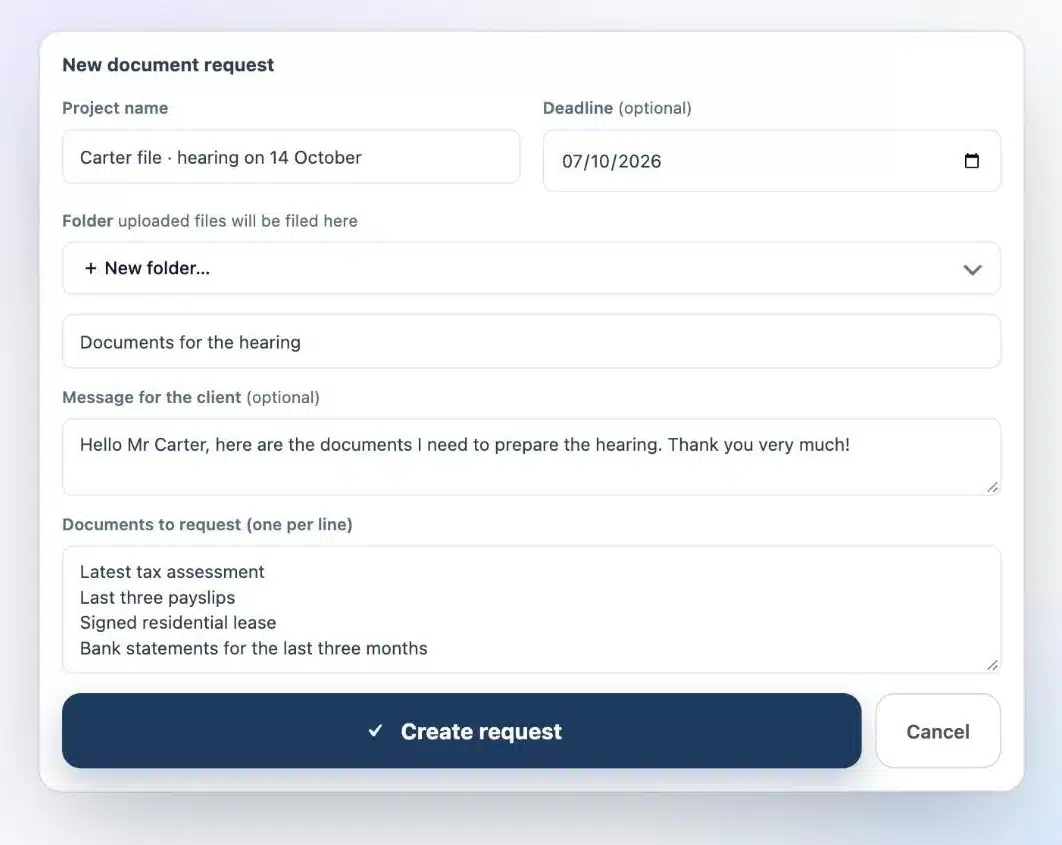
1. You list the documents, one per line
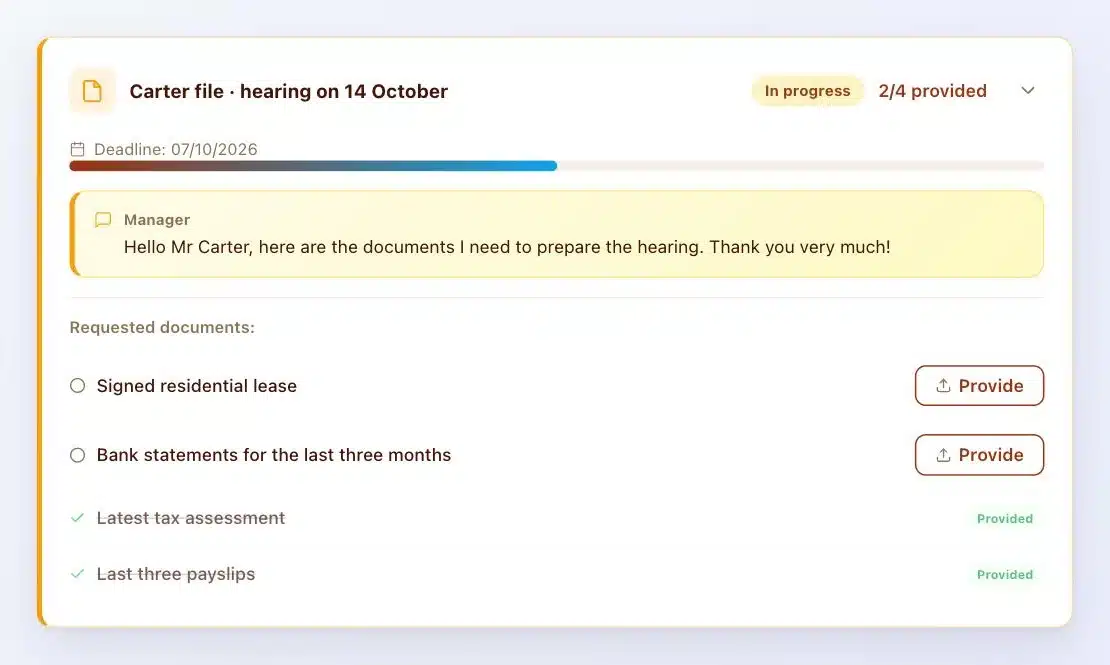
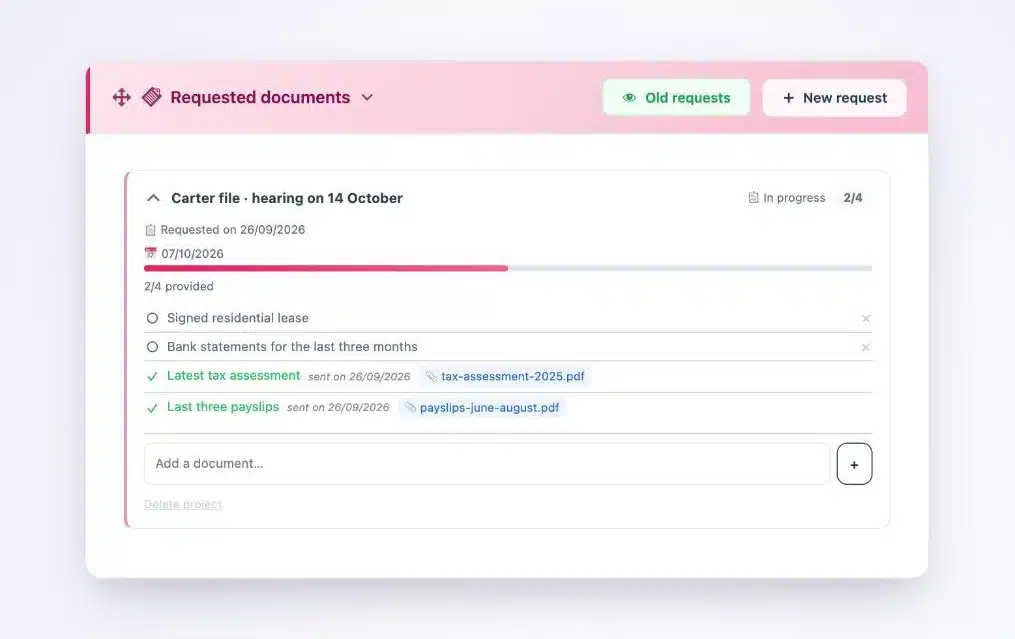
From the client’s vault, you create a document request. You give it a name, a deadline, a short message, and you list the documents you need. You also choose the folder where they will be filed when they arrive.
2. Your client uploads, document by document
Your client receives an email that takes them back to their vault. They see their list with the deadline and upload each document in the right place. Every file is encrypted as soon as it reaches your server. You are notified at each upload and watch the case fill up.
3. The vault sends the reminders for you
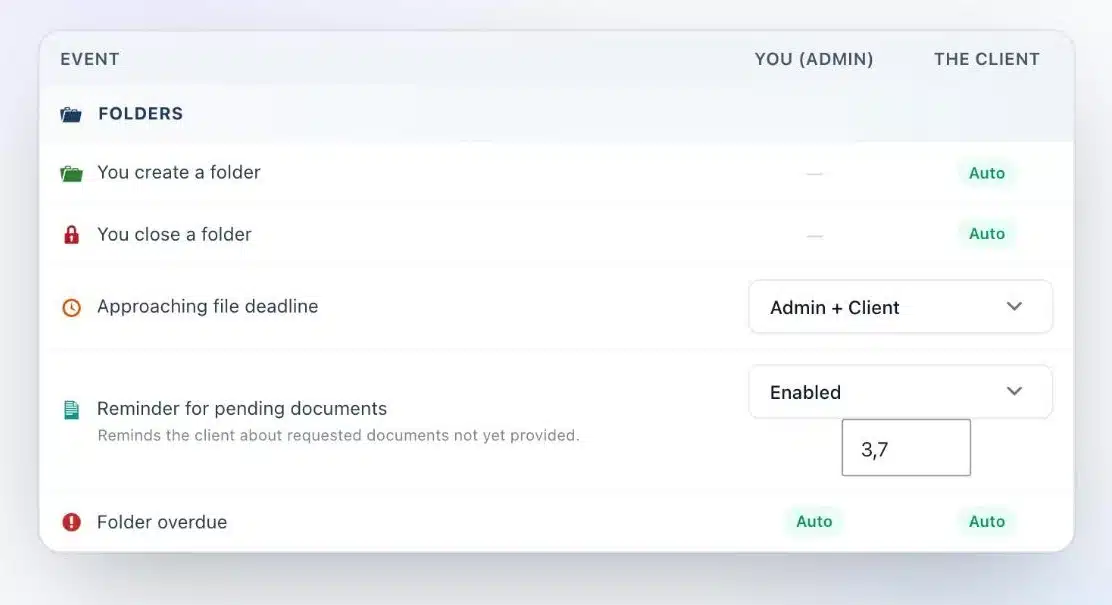
You turn on the reminder for pending documents and choose the days, for example three days and then seven days after the request. Then you stop thinking about it: the vault reminds your client about the documents still missing. As the deadline approaches, both you and your client are notified.
4. Everything is logged, and everything stays with you
The activity log records the date of every action: upload, view, download. At the end of the engagement, you export the complete case as one archive, then archive the vault in read-only mode.
Above all, everything lives on your WordPress site, with the host of your choice. Nobody else, including me, can see your documents. To choose your host, I compared OVH, Scaleway, Infomaniak and o2switch.
Are you a WordPress agency?
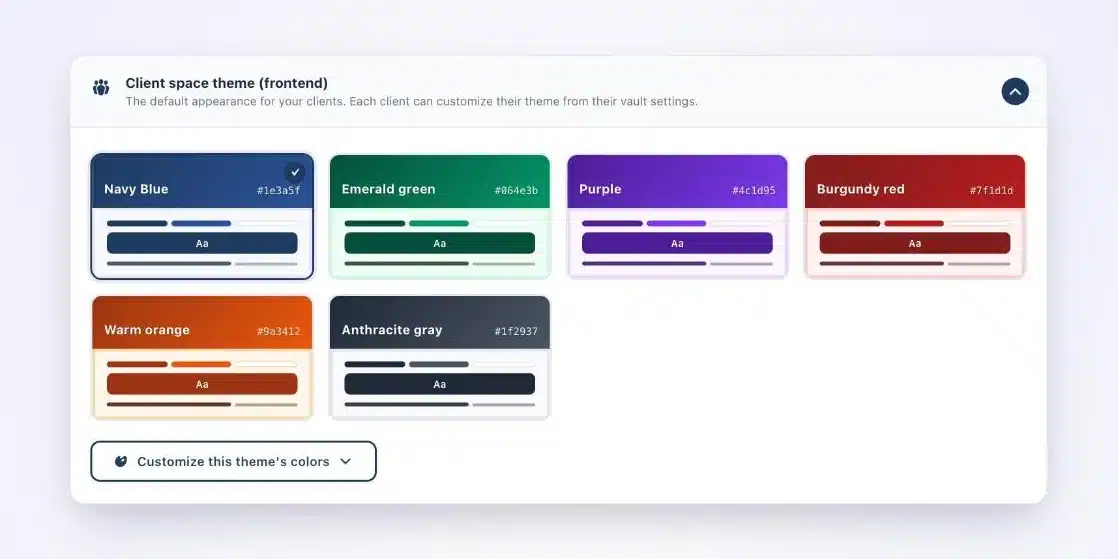
A law firm is an ideal client for you. You choose the host, secure the site, brand the vault in the firm’s colours and train the team. Client Vault relies on WordPress standards: a REST API, signed webhooks and documented hooks to connect it to the firm’s tools. The same deployment can be repeated from one firm to the next, and every step can be billed. Everything is explained on the lawyers and notaries page.
What Client Vault does not do
Let’s be honest. Client Vault does not provide qualified electronic signatures. Specialised services such as Yousign do that job very well, alongside it.
It does not replace your practice management software for billing and accounting either. It takes care of the relationship with your clients and their documents.
Finally, it is a plugin you own. It lives on your website, which needs updates and backups. If you have neither the time nor a trusted agency to handle this, take this point seriously before you start.
Next step
Client Vault for lawyers
Complete case files, without chasing a single document
In a video call, I show you document collection on a real vault, and we look together at whether it suits your firm.
- A document request created live
- The vault as your client sees it
- Automatic reminders
- Your questions about hosting
Frequently asked questions
How can I receive a client’s documents without chasing them?
Give them a clear list with a deadline, in a space where they upload each document, and let the tool send the reminders for you. With Client Vault, you choose the reminder days, for example three and seven days after the request.
Does my client need to install an app?
No. They receive an email, log in to their vault from their browser and upload their documents. Their vault is displayed in their language.
Does Article 66-5 apply to documents sent by email or WhatsApp?
Yes. Under French law, secrecy covers every document in the case, whatever the channel. That is why it is better to choose a channel where you control storage and access.
Where are the documents uploaded by my clients stored?
On your own server, with the host you chose. Every file is encrypted there. No software vendor, including me, has access to it.
What does my client see once every document is uploaded?
Their vault confirms that all the documents have been sent and that their case is being processed. On your side, you were notified at each upload.
How do I hand the case back to my client at the end of the engagement?
You export the vault as a ZIP archive, then archive it in read-only mode. The activity log keeps a record of every action.
Does Client Vault replace my practice management software?
No. It complements it. Your software keeps billing and accounting. Client Vault handles the exchanges and documents with your clients.