In brief — Client Vault Pro adds a layer of scripted journeys (individual, group, or free-form) to the Solo vault, with configurable guardrails, native community, progress widgets, advanced statistics, and LMS imports. You move from a “I send documents and hope my client follows” logic to a structured support system that tells you in real-time who is behind, who is stuck, and who needs a nudge.

What the 29-minute video concretely shows:
- The creation of a group journey with direct import from an existing LMS (Fluent Community, LearnDash, Tutor LMS)
- The configuration of guardrails at each step: video proof, quiz, checklist, event, peer validation, completed LMS lesson
- Responding to a client via video / audio recording / screen sharing directly in their vault
- Advanced statistics: difficult steps, comparison between two challenges, health score per journey
- Activation of 20+ Fluent Community widgets to transform the group into a lively learning space
Solo was the vault. Pro is the journey.
The Solo version of Client Vault has a simple goal: to provide you with an enforceable digital vault, hosted by you, for exchanging documents with your clients without depending on an American SaaS. This is robust for 90% of cases where “I need a professional space to receive/validate/archive.”
But if you are a **coach, trainer, consultant, WordPress agency** or other professional **who manages multi-stage projects**, the vault alone is not enough. You need to **design the client journey** : step 1, step 2, milestones, validations, deadlines, reminders, follow-ups, and completion tracking. Otherwise, you spend your time sending follow-up emails and asking, « where are you with that? ».
Client Vault Pro solves exactly that : it adds to the vault a layer of **scripted journeys** with guardrails, statistics, community, and widgets. You configure the journey once, enroll your clients, and the system constantly tells you : who is progressing, who is stuck, and who needs a nudge.
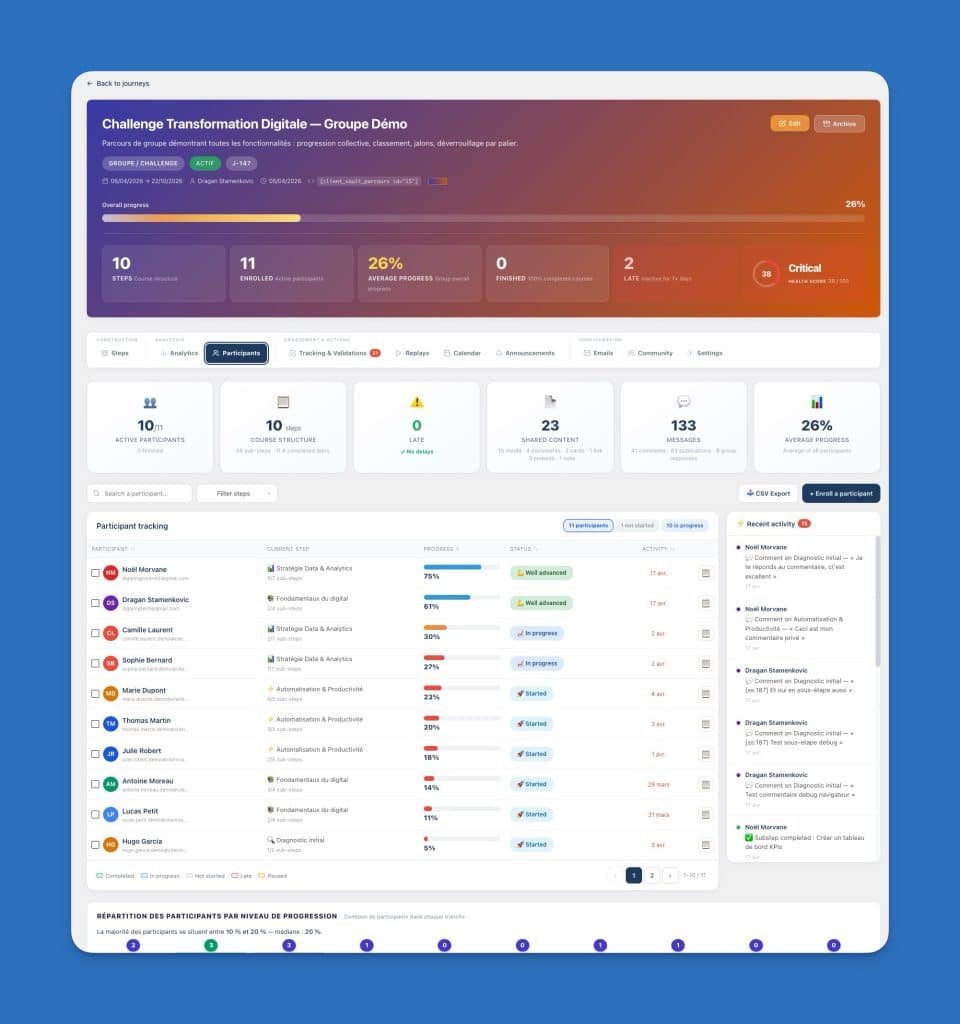
Three journey modes, for three ways of support
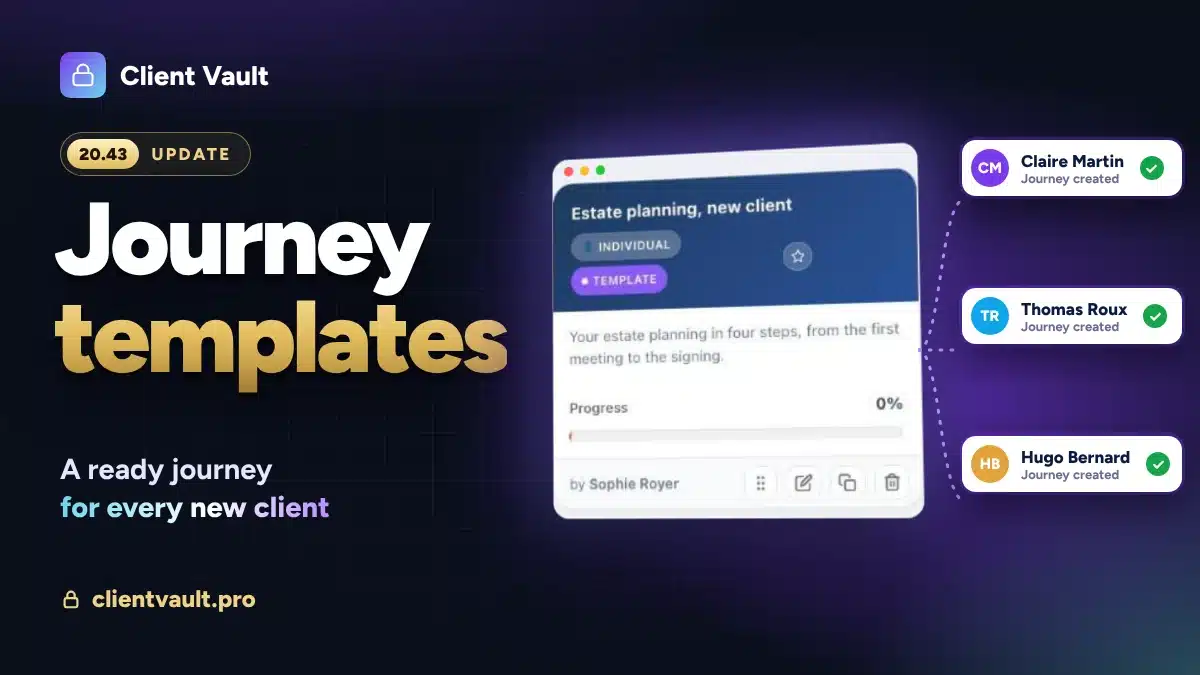
1. Individual journey (one-to-one)
One client, one tailor-made journey. Ideal for premium coaching, consultant follow-up, individual training, and client onboarding for a firm. Each client has their own pace, their own deadlines, their own content.
2. Group journey (challenge)
Multiple clients following the same path, with a common start and end date. Ideal for training cohorts, collective challenges, masterclasses. You compare participant progress, identify those who fall behind, and celebrate collective milestones (stage 5 reached by 80% of the group → automatic congratulatory notification).
3. Free Path
The client progresses at their own pace, without your intervention. Ideal for self-paced training, structured knowledge bases, evergreen programs sold with permanent access. You no longer need to follow up: the system is designed to work without you.
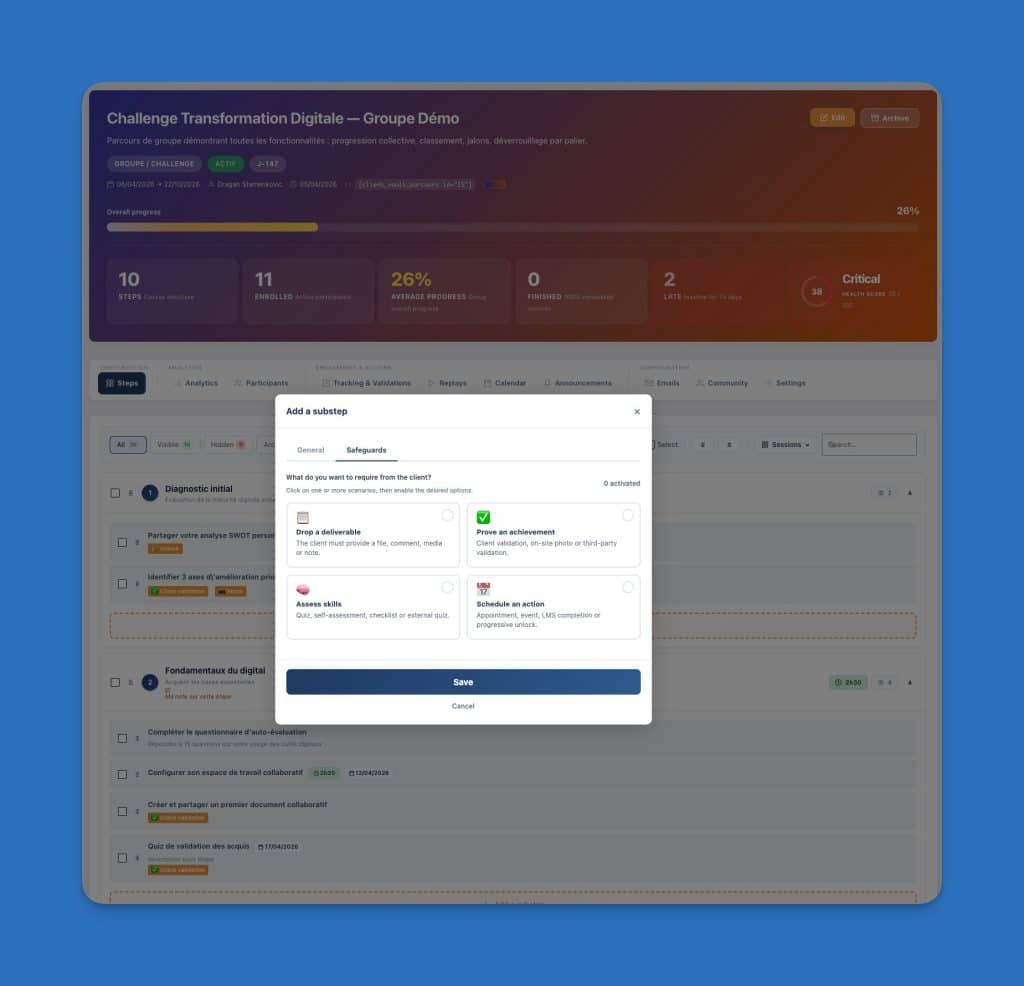
The Guardrails: Client Vault Pro’s True Differentiator
This is Pro’s central concept. At each stage of your path, you decide what needs to happen for it to be considered “validated”. Here are the types of guardrails available (can be combined):
- Document submission — the client must upload a file, a form, a link, a media, a note, or a comment
- Proof of completion — via video recorded directly in the browser, audio, or peer validation
- Assessment quiz — created directly in Client Vault (MCQ, true/false, yes/no) OR imported from Fluent Community, LearnDash, Tutor LMS, Fluent Forms, H5P, Gravity Forms, or via external link (Typeform, Tally, Fillout, Jotform)
- Self-assessment with minimum score — you set the threshold (e.g., 3/5) to unlock the next step
- Admin-validated checklist — the client checks, you validate
- Scheduled action — the client must register for and attend an event (appointment, coaching, group session) with Client Vault’s native calendar OR import from Fluent Booking, Amelia, The Events Calendar, Space Event, FC Event, or external platforms (Calendly, Cal.com, TDC, direct link)
- Validation of an existing LMS course — if lesson 14 of your LearnDash is marked as completed, Client Vault detects it and automatically unlocks the step
- Progressive unlocking — step X is unlocked if and only if steps Y and Z are validated
You can mix several safeguards on the same step. Concrete example for a business coach : « To validate step 4 of the journey, the client must (a) upload their business proposal, (b) present it in a 2-min video, (c) register for my Friday group coaching, and (d) obtain at least 4/5 on the self-assessment ».
The system becomes a real pedagogical safety net that prevents the client from moving on until they have truly absorbed the current step.
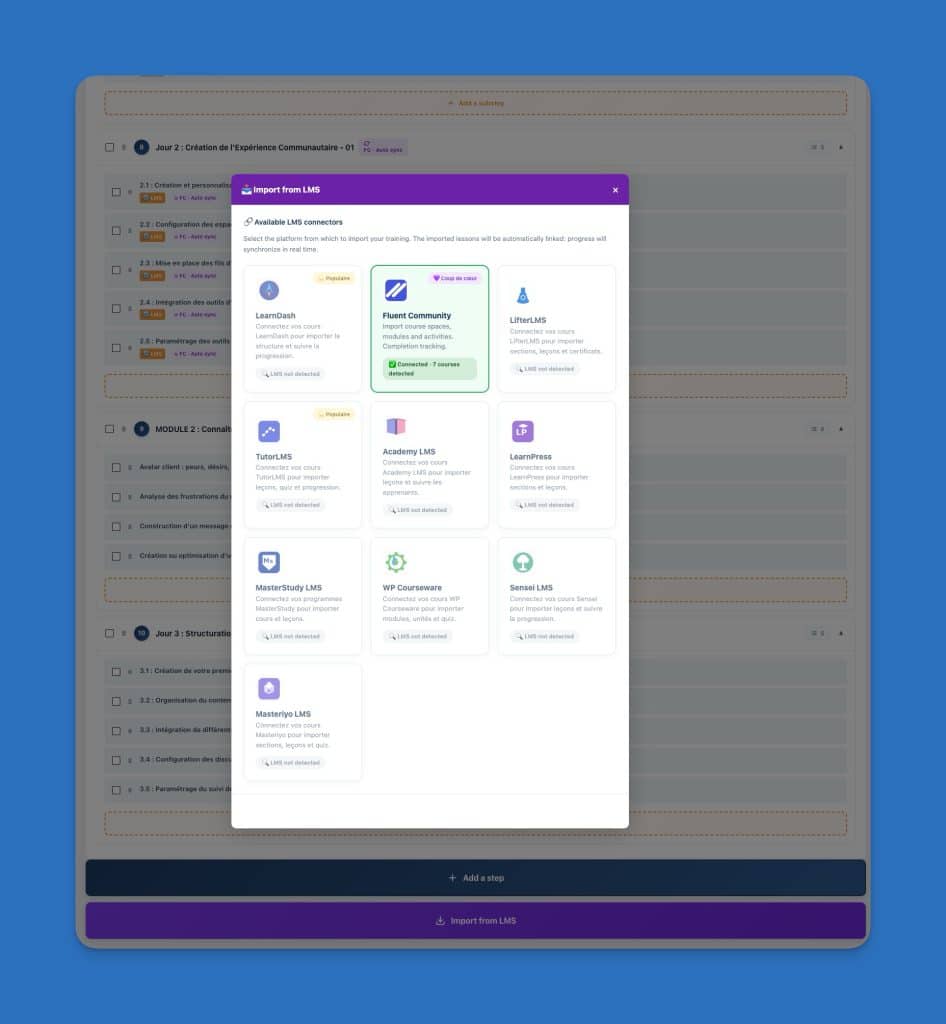
Import your existing content in 2 clicks from your LMS
If you already have courses in Fluent Community, LearnDash, Tutor LMS, you don’t have to redo anything. You click on “Import an LMS”, Client Vault automatically detects your content, and each lesson becomes a pre-filled journey step (title, estimated duration, order, sub-steps). You then configure the guardrails step by step.
You avoid double entry. You keep your LMS as the content source, and Client Vault becomes the orchestration and management layer on top.
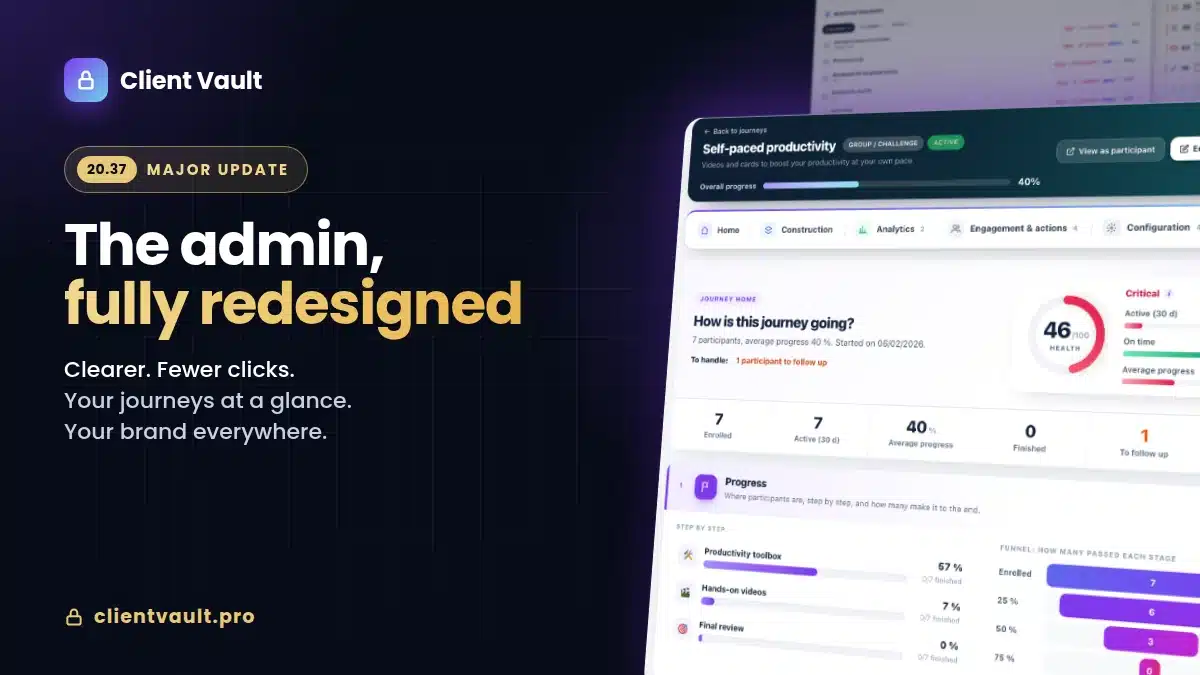
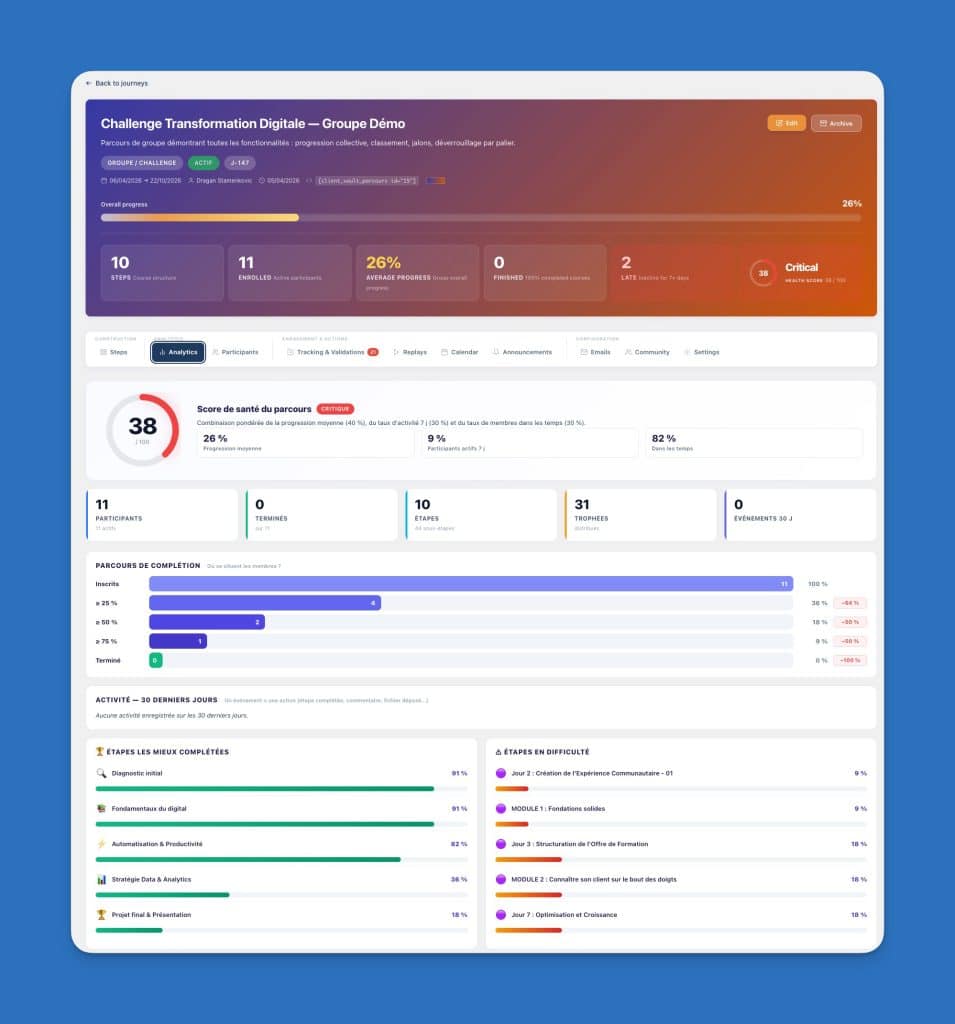
The dashboard that tells you where to act in 10 seconds
Beyond the journey, Pro unlocks an operational dashboard designed so that a coach or consultant knows in less than 10 seconds where to focus their energy for the day:
- Overall Health Score — a synthetic score of your vault’s status (pending documents, inactive clients, blocked steps). At a glance, you see if everything is going well or if you have backlog to catch up on.
- Alerts & Signals — pending comments, unviewed documents, overdue requests, exceeded quotas, broken links, clients inactive for 10+ days
- Journey View — number of active journeys, number of enrolled participants, number completed, number blocked by step
- Global Calendar — all events from all your journeys in a unified view
- 30-Day Engagement — unique connections, recorded actions, comments exchanged, files uploaded by clients
Advanced Statistics: True Data-Driven Pedagogy
For each journey, you get access to analytics that are worth their weight in gold to optimize your pedagogical method:
- Health Score by Challenge — overall status of a current journey
- Progress Distribution — how many enrolled participants are at 25%, 50%, 75%, 100%
- Best Completed Steps — the ones that go smoothly, to keep
- Difficult Steps — where your clients get stuck. This is the most valuable information : you know exactly which step to rewrite or break down.
- Comparison between two challenges — did you launch cohort A in March and cohort B in May ? You compare the two side by side to measure the impact of the changes you made between them.
- Participants ahead / behind schedule — you know who to congratulate and who to follow up with manually
Enhanced Communication: comment via video, audio, or screen sharing
On any document or content submitted by a client, you can react by :
- A classic text comment
- A direct video recording from your browser (camera)
- A direct audio recording (microphone)
- A recorded screen share (ideal for quickly explaining a complex point)
All recordings are stored in the client’s vault, euro-dated to the second, and trigger an email notification on the client side. You replace long emails with 90-second videos that explain better and create a much stronger connection.
Native Community: 20+ widgets to engage your clients
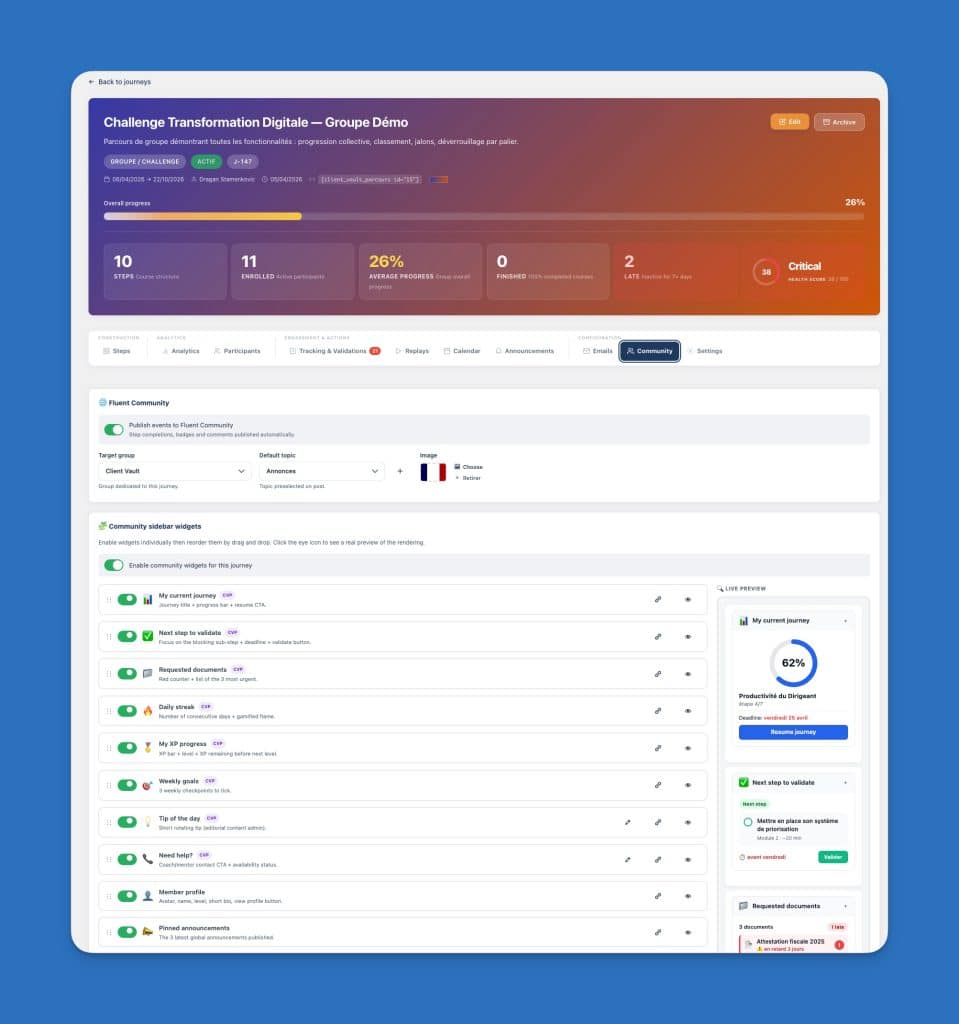
If you have (or install) the free Fluent Community plugin, Client Vault Pro automatically integrates with it. Each journey can be linked to a Fluent Community group, with automatic publication of important events (step completed, validation, collective milestone) in the group’s feed.
Pro unlocks 20+ contextualized widgets that you activate in the group sidebar:
- Member Profile with their journey progression
- Ranking of challenge participants
- Trophies won per step
- Upcoming Events of the journey
- Announcements you send to the group
- Active Discussions
- Members Online in real-time
- Personal Health Score of the member
- Next Steps to validate
- Requested Documents
- Goals of the Week
- Tip of the Day
- Need Help with custom link (chat, call, support)
- Personal Dashboard
- Group Health
- Certificates obtained
- and much more
The result: your Fluent Community group stops being a simple discussion list and becomes a true living learning space, where each member constantly sees where they stand, where others are, and what they need to do next.
Customizable emails, A/B tests, modification history
Pro unlocks the complete email template editor. Every email sent by Client Vault (new document, coach validation, D+3 reminder, milestone reached, etc.) is fully customizable: subject, body, tone, formatting. Default templates are already translated into 11 languages natively.
For optimization enthusiasts: each template features an integrated A/B test (version A vs version B) and a modification history to revert if the new version performs worse.
Fluent CRM, Webhooks, REST API, unlimited integrations
Client Vault Pro exposes a complete REST API (custom key, all documented endpoints) and a webhook system (compatible with Zapier, Make, n8n, FluentCRM) so that each Client Vault event triggers an action elsewhere: add the client to an email sequence, enrich your CRM, create a task in your management tool, publish to Slack, etc.
Do you want that “as soon as a client completes the journey, they are automatically added to the ‘Alumni’ list in FluentCRM and receive the premium congratulatory email”? Three clicks, and it’s done.
Even simpler, native connectors for the Fluent CRM plugin are already integrated
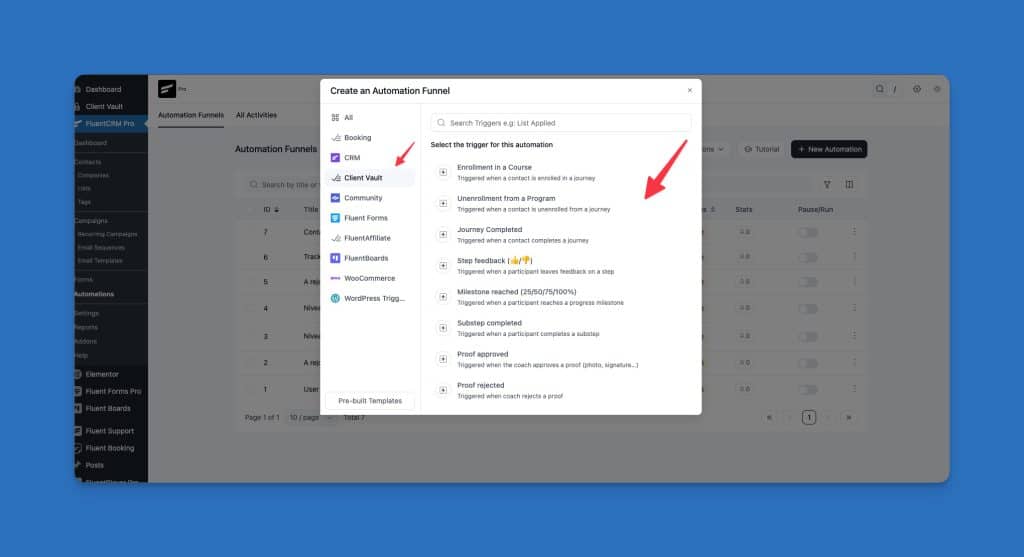
7 native triggers for starting an automation
- Client enrolled in a journey (Ideal for: starting a welcome sequence, tagging the contact, adding to a “Phase 1” list.)
- Client unenrolled from a journey (Ideal for: triggering a feedback sequence, removing the “active” tag, sending a farewell email.)
- Journey completed (Ideal for: sending the diploma/certificate, asking for a review, offering an upsell, tagging “alumni”.)
- Step completed (Ideal for: congratulating at each step, suggesting a complement, segmenting by progress.)
- Feedback on a step (Ideal for: thanking the client, escalating if negative feedback, tagging to rework the pedagogy.)
- Milestone reached (Triggered at 25 / 50 / 75 / 100 %. Ideal for: celebrating, sending a goodie, requesting a mid-course testimonial.)
- Safeguard validated (Ideal for: confirming that the condition is met, tagging « validated X », moving to the next phase of the FluentCRM sequence.)
2 native triggers in an automation
- Enrollment in a journey
- Unenrollment from a journey
Granular access control: delegate with confidence
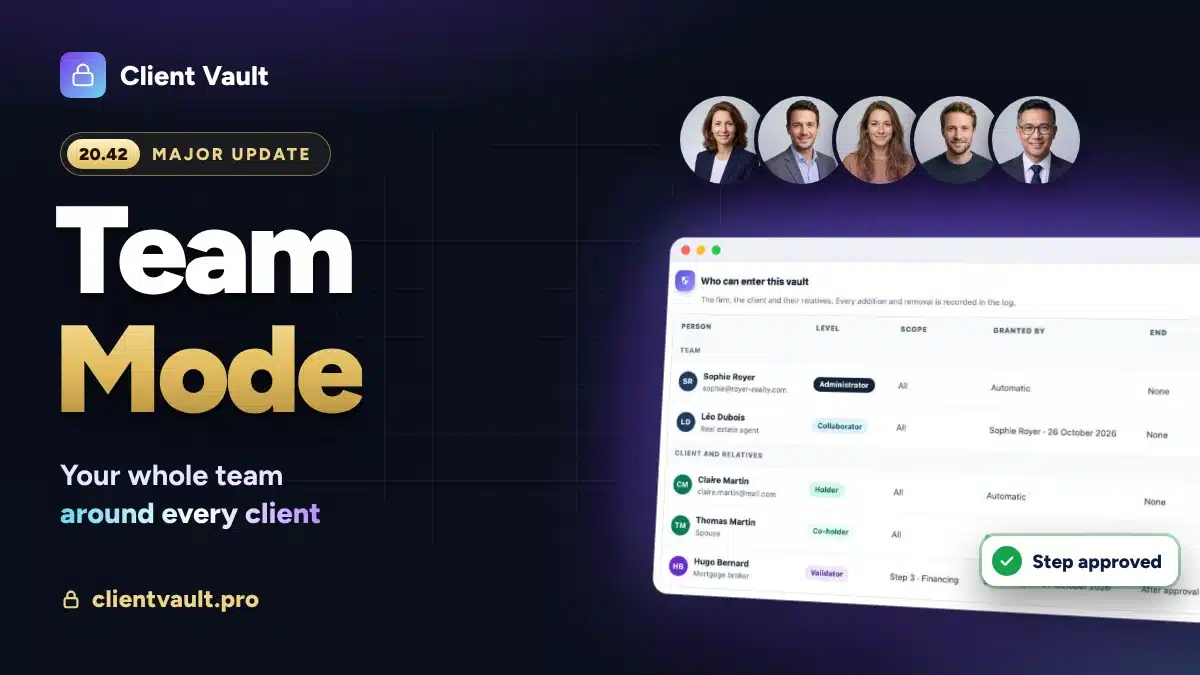
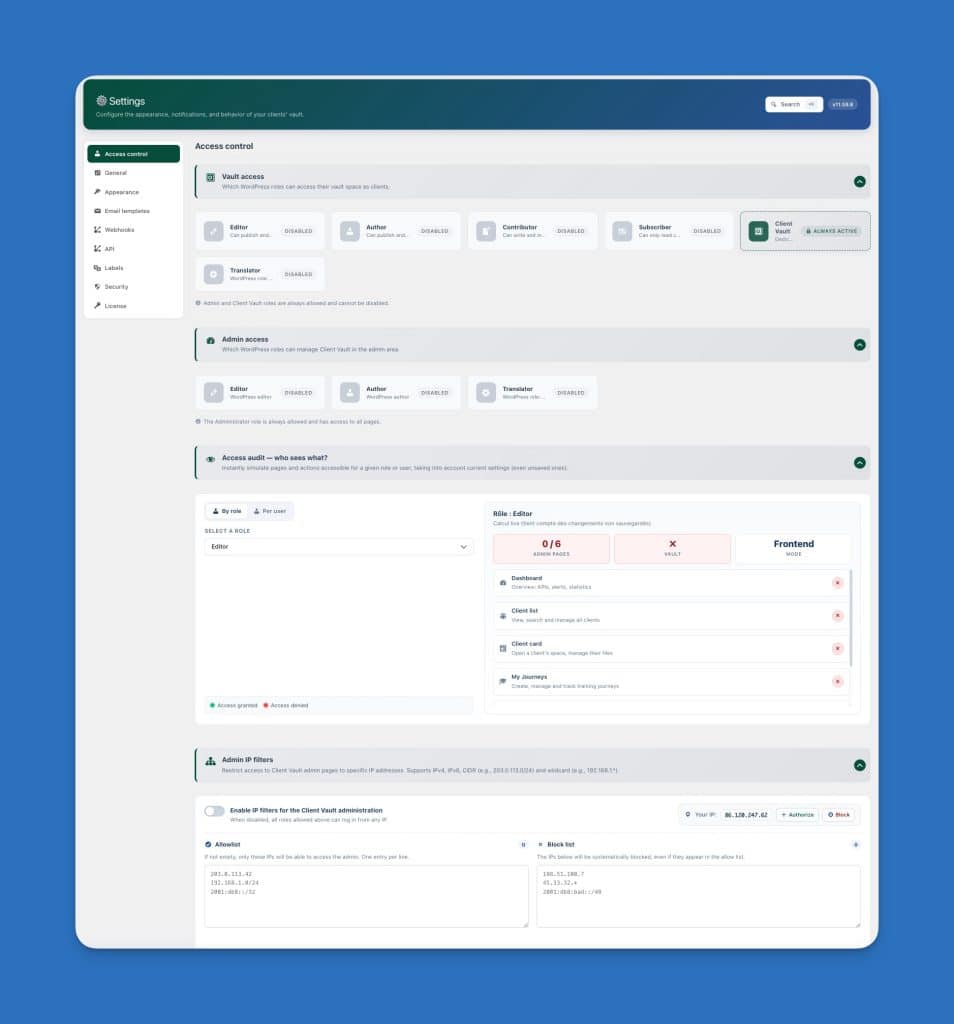
Pro adds WordPress role-based access control : you decide who on your team can view/edit/validate what. Your assistant has access to client folders but not to email templates. Your trainer can validate steps but not modify the journey configurations. You can also filter access by IP address range for enhanced security.
For whom does Pro really make sense ?
| Profession | Typical Pro Usage |
|---|---|
| Business / Lifestyle Coach | Scripted programs over 8 to 12 weeks, collective milestones, peer validation, video feedback |
| Qualiopi Trainer | Enforceable attendance sheets, training audits, individual courses with timestamped evidence, secure replays |
| Consultant / Mentor | New client onboarding in 8 steps, structured deliverables, automatic accountability |
| Sports Coach | Video sessions submitted by the student, form validation, periodization by cycles |
| Accountant / Firm | Client onboarding (structured document collection), annual balance sheet broken down into steps, automatic reminders |
| WordPress Agency | New client onboarding: brief, acceptance testing, going live, training, support — all in a single journey |
| Lawyer / Notary | Case management in several steps (document collection, pleading, hearing), with timestamped validations |
| Architect | Project phases (sketch, preliminary design, detailed preliminary design, tender documents, provisional acceptance), client validation at each milestone |
Discover the complete list of features or consult the Industries page to see how each profession configures its typical journey.
Sovereign, self-hosted, anti-SaaS by design
Like Solo, Client Vault Pro is a WordPress plugin that you install on your own server (OVH, o2switch, Infomaniak, PlanetHoster, your dedicated server — it doesn’t matter). None of your clients’ data passes through Client Vault’s servers. No third-party publisher has any visibility into what your clients upload.
Consequences :
- No user limit. You manage 10 or 10,000 clients on the same journey without extra cost.
- No commission. The price is a fixed annual or lifetime fee.
- No per-end-user license. The client is in your database, not a third-party publisher’s.
- Native GDPR by design. You are the data controller, not a foreign publisher.
- If Client Vault disappears tomorrow, your vault will continue to operate. Your database and content belong to you.
For WordPress agencies reselling client journeys to their trainer, coach, or consultant clients : Pro deploys in 3 minutes on any client WP site. Full white label. No per-end-user license. The Pro 5+ sites pack is designed precisely for this use case.
What Pro Does Not Do (The Honest Limitations)
- No integrated payment. Client Vault Pro manages the client journey, not sales. Combine it with WooCommerce, SureCart, Fluent Cart, or Stripe Checkout to handle payments.
- No content generation. If you want to create your course videos, PDFs, or quizzes: use your usual LMS (LearnDash, Tutor, Fluent Community). Pro imports and orchestrates them, but does not replace them.
- No real-time messaging like Slack/Discord. Discussions are asynchronous (document comments, activity feed, coach discussion area). For live chat, connect Fluent Community + its chat module.
Frequently Asked Questions
Does Pro include all Solo features ?
Yes, entirely. Pro = Solo + scripted journeys + community + analytics + customizable emails + API/webhooks + role-based access control. No Solo features are lost when upgrading.
Can I upgrade from Solo to Pro later without losing my data ?
Yes. You deactivate the Solo license, apply the Pro license, and all your data (clients, documents, validations) is retained. No manual migration is necessary.
Do I need to purchase Fluent Community separately ?
No. Fluent Community is a free plugin developed by WP Manage Ninja. Client Vault Pro auto-detects it upon installation and activates the gateway automatically. No action is required on your part.
How many journeys can I create ?
No limit. You can create as many journeys as you want, with as many steps and sub-steps as necessary, and as many participants as you wish. The only limit is the power of your WordPress hosting.
Does Pro work with my existing LMS (LearnDash, Tutor, etc.) ?
Yes. Pro natively imports content from Fluent Community, LearnDash, Tutor LMS and recognizes validated lessons as guardrails. Other LMS will be added progressively. You keep your LMS as the content source; Pro becomes the orchestration layer.
Is Pro compliant with GDPR and Qualiopi ?
GDPR: yes by design (self-hosting, you are the data controller, ZIP/CSV export and one-click account deletion). Qualiopi: yes thanks to opposable timestamped attendance sheets, proofs of completion, and the complete audit log. Training organizations use Pro to prepare for their audits.
Is Pro white-labeled for agencies?
Yes, full white-labeling like Solo. Customizable admin and frontend colors, branding under your agency’s or end client’s identity, emails sent from your domain name. No mention of “Client Vault” visible to the end client.
What webhooks / integrations are available?
35+ webhook events (compatible with Zapier, Make, n8n, FluentCRM): file upload, validation, new comment, document request, deadline reminder, stage change, milestone reached, badge earned, journey completed, etc. The REST API exposes all CRUD endpoints for advanced use.